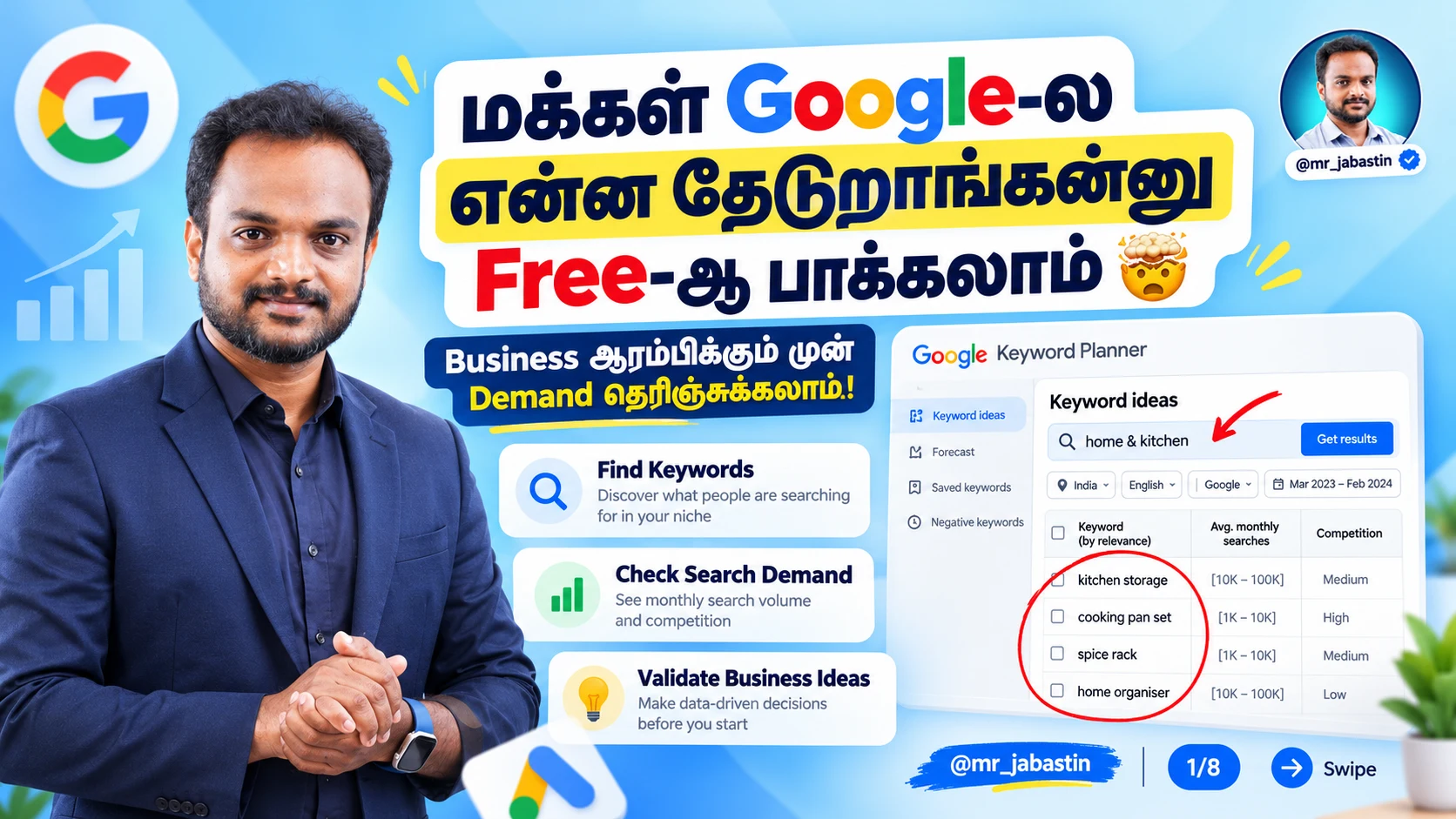
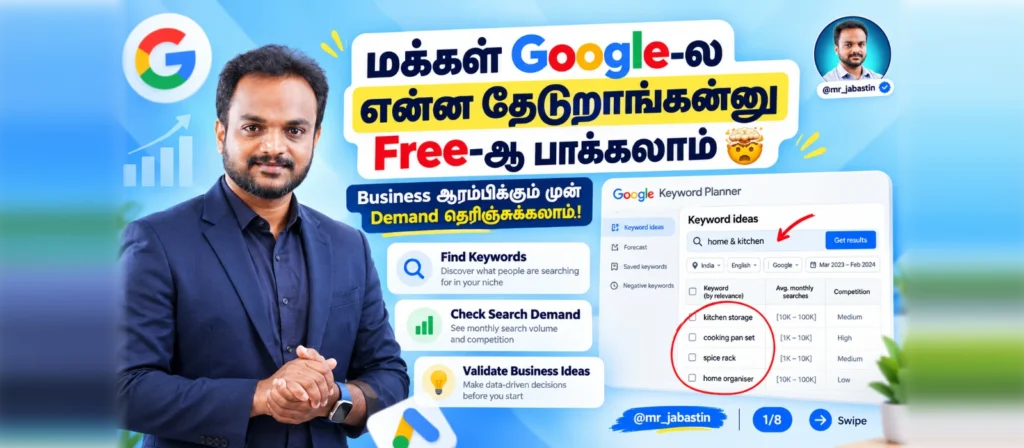
Google Keyword Planner in Tamil – Free Keyword Research செய்வது எப்படி? Complete Beginner’s Guide
Google Keyword Planner in Tamil பற்றி தெரிந்துகொள்ள இது சரியான நேரம்! நீங்கள் புதிதாக Online Business தொடங்கப் போகிறீர்களா? Amazon, Flipkart, Meesho அல்லது சொந்த Website மூலம் Products விற்பனை செய்ய விரும்புகிறீர்களா?
அப்படியானால் முதலில் நீங்கள் தெரிந்துகொள்ள வேண்டிய முக்கியமான விஷயம் மக்கள் Google-ல் என்ன தேடுகிறார்கள்? என்பதுதான்.
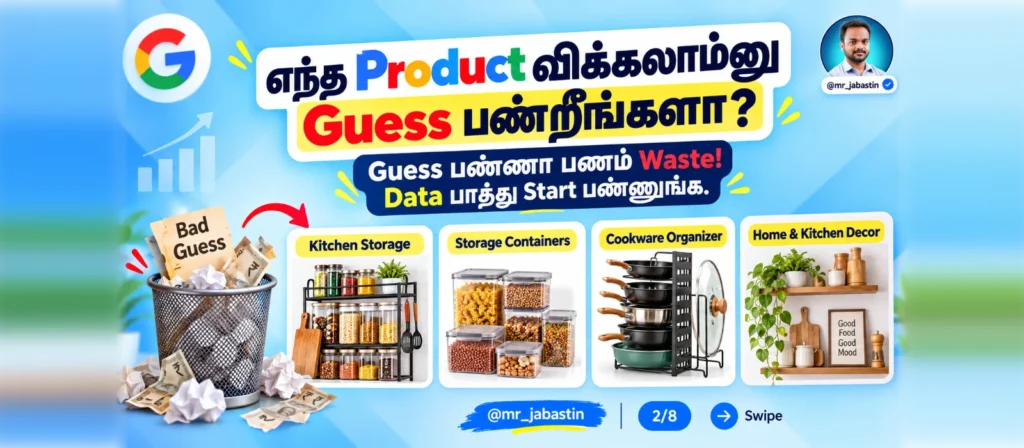
ஒரு Product-ஐ தேர்வு செய்யும்போது பலரும் செய்யும் பொதுவான தவறு என்ன தெரியுமா?
“இந்த Product நல்லா விற்கும்!”, “இதை எல்லாரும் வாங்குவாங்க!” என்று நினைத்து எந்த Research-மும் செய்யாமல் Stock வாங்குவது.
ஆனால் அந்த Product-க்கு உண்மையில் Online Search Demand இருக்கிறதா என்பதை எப்படி தெரிந்துகொள்வது?
இதற்கு உதவக்கூடிய ஒரு Free Tool தான் Google Keyword Planner.
இந்த Google Keyword Planner in Tamil Guide-ல் Google Keyword Planner என்றால் என்ன, அதை எப்படி பயன்படுத்துவது, Monthly Search Volume எப்படி பார்ப்பது, Home & Kitchen Products-க்கு Demand எப்படி Research செய்வது, Content Ideas எப்படி கண்டுபிடிப்பது போன்றவற்றை Step-by-Step தமிழில் பார்க்கலாம்.
💡 Keyword Research முதல் Google Ads, Meta Ads வரை Digital Marketing-ஐ முழுமையாக தமிழில் கற்றுக்கொள்ள எங்கள் Digital Marketing Course in Tamil-ஐ பாருங்கள்.
1. Google Keyword Planner என்றால் என்ன? (What is Google Keyword Planner?)
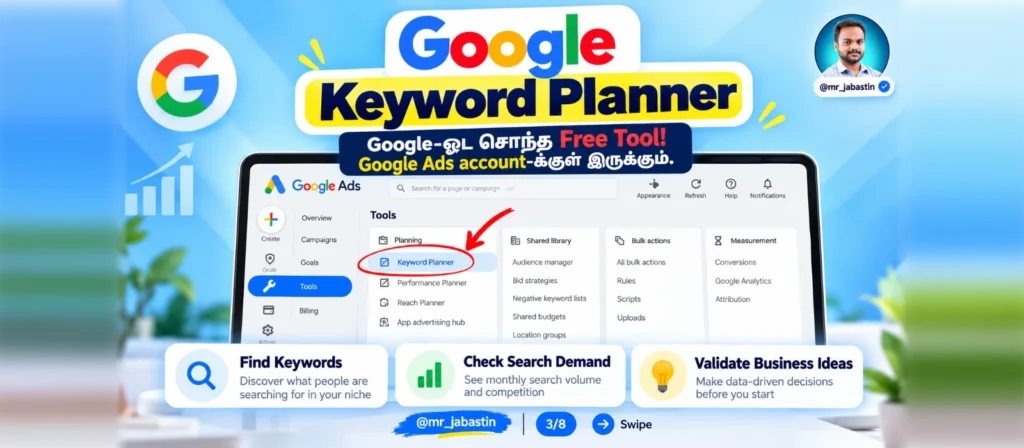
Google Keyword Planner என்பது Google வழங்கும் ஒரு Keyword Research Tool. இது Google Ads Account-க்குள் கிடைக்கிறது.
ஒரு Product அல்லது Service தொடர்பான Keywords-ஐ மக்கள் Google Search-ல் எவ்வளவு தேடுகிறார்கள் என்பதற்கான மதிப்பீடுகளை அறிந்துகொள்ள இது உதவுகிறது.
உதாரணமாக, நீங்கள் Home & Kitchen Products விற்பனை செய்கிறீர்கள் என்று வைத்துக்கொள்வோம்.
உங்கள் Product தொடர்பாக மக்கள் என்னென்ன Keywords Search செய்கிறார்கள் என்பதை அறிந்துகொள்ளலாம்.
உதாரணங்கள்:
- Kitchen Storage
- Kitchen Organizer
- Dish Drying Rack
- Wall Mounted Kitchen Rack
- Home Storage Box
- Modular Kitchen Accessories
இதுபோன்ற Keywords-க்கான Average Monthly Searches, Advertising Competition, Estimated Bid Range ஆகியவற்றைப் பார்க்கலாம்.
இந்தத் தகவல்கள் உங்கள் Business Research, Google Ads Planning மற்றும் Content Marketing ஆகியவற்றுக்கு உதவியாக இருக்கும்.
2. Google Keyword Planner in Tamil – Free-ஆக பயன்படுத்துவது எப்படி?
Google Keyword Planner பயன்படுத்துவதற்கு தனியாக Tool Subscription Fee கிடையாது.
ஆனால் Google Ads Account தேவைப்படும். Account Setup-க்கு Billing Information போன்ற விவரங்கள் கேட்கப்படலாம்.
Ads Run செய்யாமல் Keyword Research செய்யும் வசதி இருந்தாலும், Account Status மற்றும் Advertising Activity-ஐப் பொறுத்து சில Search Volume Details Ranges-ஆக மட்டும் காட்டப்படலாம்.
இப்போது Tool-ஐ எப்படி பயன்படுத்துவது என்று பார்ப்போம்.
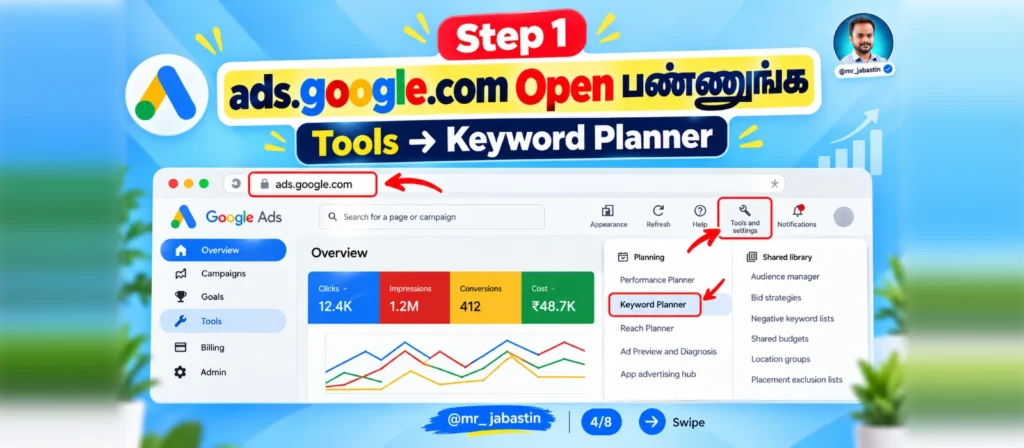
Step 1: Google Ads Website Open செய்யுங்கள்
முதலில் Google Ads Website-க்குச் செல்லுங்கள்.
உங்கள் Google Account மூலம் Sign In செய்து தேவையான Account Setup-ஐ முடிக்கவும்.
Google Ads Dashboard-க்குள் சென்ற பிறகு, Google Ads Keyword Planner Tool-ஐ Open செய்ய:
Tools → Planning → Keyword Planner
என்ற Option-ஐ Select செய்யுங்கள்.
Step 2: Discover New Keywords Select செய்யுங்கள்
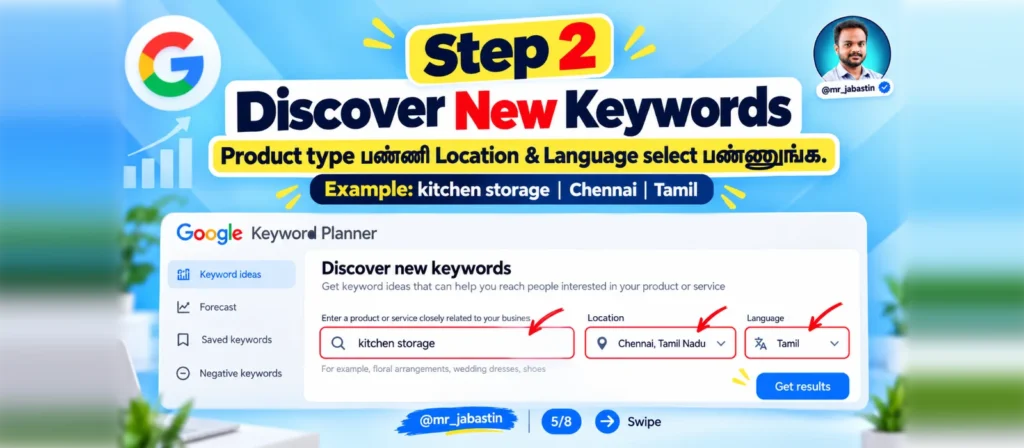
Keyword Planner Open ஆனதும் இரண்டு முக்கிய Options இருக்கலாம்:
Discover New Keywords: புதிய Keyword Ideas கண்டுபிடிக்க.
Get Search Volume and Forecasts: ஏற்கனவே உங்களிடம் இருக்கும் Keyword List-ஐ வைத்து Volume மற்றும் Forecast தகவல்கள் பார்க்க.
புதிய Business ஆரம்பிப்பவர்கள் Discover New Keywords என்ற Option-ஐ பயன்படுத்தலாம்.
Step 3: Product Keyword Enter செய்யுங்கள்
இப்போது நீங்கள் Research செய்ய விரும்பும் Product பெயரை Enter செய்ய வேண்டும்.
உதாரணமாக:
Kitchen Storage
அடுத்ததாக Location-ஐ Chennai என்று Select செய்யுங்கள். உங்கள் Audience பயன்படுத்தும் Search Language-ஐயும் தேர்ந்தெடுக்கவும்.
Example Settings:
| Setting | Example |
|---|---|
| Product Keyword | Kitchen Storage |
| Location | Chennai |
| Language | Tamil அல்லது English |
| Search Network |
பிறகு Get Results என்பதை Click செய்யுங்கள்.
Google உங்கள் Product தொடர்பான Keyword Ideas மற்றும் Search Estimates-ஐ காட்டும்.
3. Keyword Research-ல் என்னென்ன தகவல்கள் கிடைக்கும்?
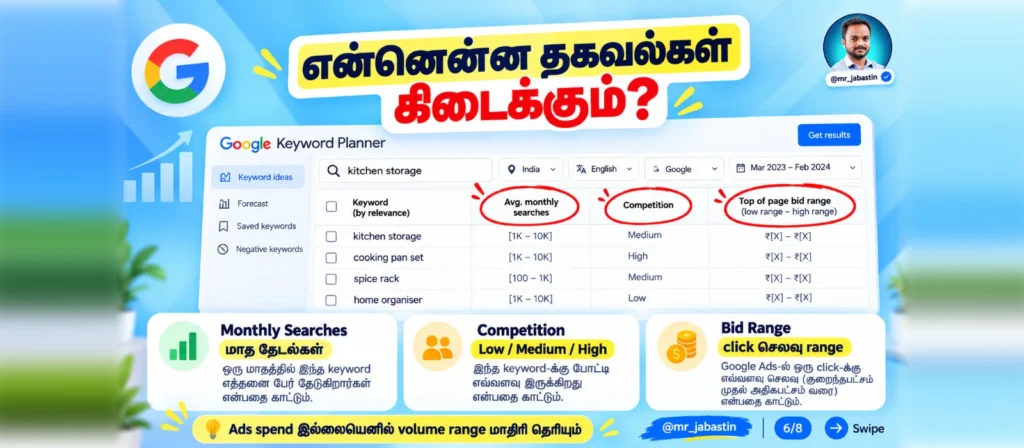
Google Keyword Planner-ல் பல Metrics இருந்தாலும் Beginners தெரிந்துகொள்ள வேண்டிய மூன்று முக்கியமான Metrics இருக்கின்றன.
Average Monthly Searches – மாதாந்திர தேடல்கள்
ஒரு Keyword சராசரியாக ஒரு மாதத்திற்கு எத்தனை முறை Search செய்யப்படுகிறது என்பதற்கான மதிப்பீட்டை இது காட்டுகிறது.
உதாரணமாக Kitchen Storage Keyword-ஐ Research செய்யும்போது Search Volume Range காட்டப்படலாம்.
1K–10K என்பது Search Volume எப்படி Range-ஆக காட்டப்படலாம் என்பதற்கான உதாரணம் மட்டுமே; Kitchen Storage Keyword-ன் உண்மையான Data அல்ல.
இதைக் கொண்டு Product மீதான Search Interest-ஐ ஆரம்ப நிலையில் புரிந்துகொள்ளலாம்.
ஆனால் Search Volume என்பது Product Sales எண்ணிக்கையோ, தனிப்பட்ட Customers எண்ணிக்கையோ அல்ல.
Competition – விளம்பரதாரர்கள் போட்டி
Competition Metric மூலம் Google Ads-ல் குறிப்பிட்ட Keyword-க்கு விளம்பரதாரர்களிடையே இருக்கும் போட்டி அளவைப் பார்க்கலாம்.
| Competition | Meaning |
|---|---|
| Low | குறைந்த Advertising Competition |
| Medium | நடுத்தர Advertising Competition |
| High | அதிக Advertising Competition |
ஒரு Keyword-க்கு High Competition இருக்கிறது என்பதால் அந்த Product அதிகம் விற்கும் என்று அர்த்தமில்லை.
இது Google Ads விளம்பர போட்டி பற்றிய தகவல் மட்டுமே.
Top of Page Bid Range – Ads செலவு மதிப்பீடு
Google Search Results-ன் Top Position-ல் Ads காட்டுவதற்கான Historical Bid Estimates-ஐ இந்த Metric தெரிவிக்கிறது.
இதில் Low Range மற்றும் High Range போன்ற Estimates கிடைக்கலாம்.
இந்தத் தொகைகள் உங்கள் Ads-க்கு உறுதியாக வசூலிக்கப்படும் Actual CPC அல்ல. உண்மையான Advertising Cost பல காரணிகளைப் பொறுத்து மாறும்.
4. Home & Kitchen Products Demand Research – Practical Example
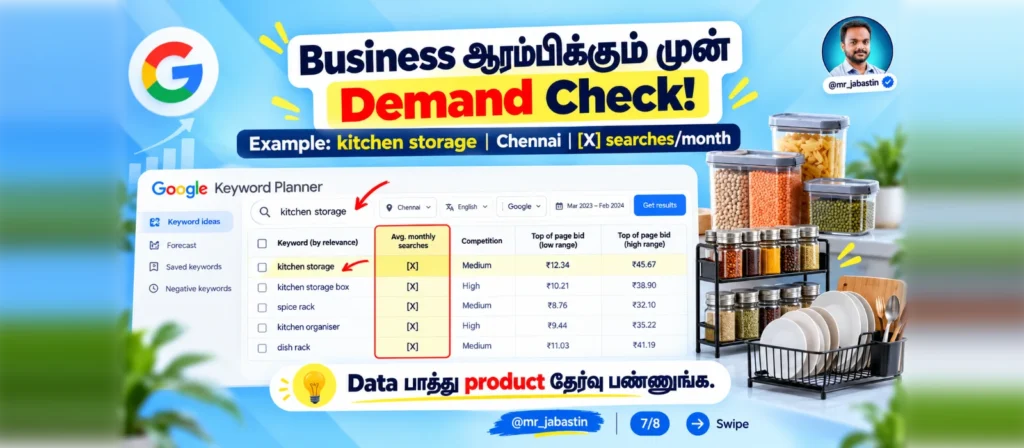
நீங்கள் Amazon, Flipkart, Meesho அல்லது உங்கள் சொந்த Website-ல் Home & Kitchen Products விற்பனை செய்ய விரும்புகிறீர்கள் என்று வைத்துக்கொள்வோம்.
உங்களிடம் சில Product Ideas இருக்கின்றன:
- Kitchen Storage Rack
- Dish Drying Rack
- Wall Mounted Shelf
- Kitchen Organizer
- Home Storage Box
இந்த Products-ல் எதற்கு அதிக Search Demand இருக்கிறது என்பதை Google Keyword Planner மூலம் Research செய்யலாம்.
முதலில் ஒவ்வொரு Product Keyword-ஐயும் Enter செய்து அதன் Monthly Search Volume மற்றும் Competition-ஐப் பார்க்க வேண்டும்.
Example: Kitchen Storage Products
| Keyword | Monthly Searches | Competition |
|---|---|---|
| Kitchen Storage | Planner-ல் பாருங்கள் | Low / Medium / High |
| Kitchen Organizer | Planner-ல் பாருங்கள் | Low / Medium / High |
| Dish Drying Rack | Planner-ல் பாருங்கள் | Low / Medium / High |
| Wall Mounted Kitchen Rack | Planner-ல் பாருங்கள் | Low / Medium / High |
| Home Storage Box | Planner-ல் பாருங்கள் | Low / Medium / High |
மேலே உள்ளவை Research செய்ய வேண்டிய Example Keywords மட்டுமே. உங்கள் Google Keyword Planner-ல் வரும் உண்மையான Monthly Searches மற்றும் Competition Data-வை வைத்து Compare செய்யுங்கள்.
Keyword Research முடிந்த பிறகு எந்த Product-க்கு அதிக Search Interest உள்ளது என்பதை ஒப்பிடலாம்.
ஆனால் ஒரு முக்கியமான விஷயத்தை மறந்துவிடக்கூடாது.
அதிக Search Volume = அதிக Sales என்று அர்த்தமில்லை.
Product Price, Profit Margin, Customer Demand, Competitor Pricing, Shipping Cost போன்றவற்றையும் ஆராய்ந்த பிறகே Product Selection செய்ய வேண்டும்.
மேலே பார்த்த Steps-ஐ உங்கள் Products-க்கு Apply செய்தால், Google Keyword Planner in Tamil மூலம் Guess Work இல்லாமல் Stock மற்றும் Content Plan செய்யலாம்.
5. Location-wise Demand கண்டுபிடிப்பது எப்படி?
நீங்கள் ஒரு Home & Kitchen Products Business நடத்துகிறீர்கள் என்று வைத்துக்கொள்வோம்.
உங்கள் Products-ஐ Chennai, Coimbatore, Madurai போன்ற இடங்களில் விற்பனை செய்ய விரும்புகிறீர்கள்.
எந்த Location-ல் மக்கள் உங்கள் Products தொடர்பாக அதிகம் Search செய்கிறார்கள் என்று தெரிந்துகொள்ள Google Keyword Planner உதவும்.
உதாரணமாக, Kitchen Organizer Keyword-ஐ எடுத்துக்கொள்வோம்.
முதலில் Chennai Location-ஐ மட்டும் Select செய்து Search Volume பாருங்கள். பிறகு Coimbatore, Madurai போன்ற இடங்களைத் தனித்தனியாகத் தேர்ந்தெடுத்து அதே Keyword-ஐ Research செய்யுங்கள்.
இப்படி ஒவ்வொரு Location-க்கும் கிடைக்கும் Search Volume Estimates-ஐ Compare செய்யலாம்.
இதன் மூலம்:
- எந்த Location-ல் Google Ads Target செய்யலாம்?
- எந்த Area Customers-க்கு Marketing Content உருவாக்கலாம்?
- எந்த நகரங்களில் Product Search Interest இருக்கிறது?
போன்ற கேள்விகளுக்கான ஆரம்பத் தகவல்கள் கிடைக்கும்.
Google Keyword Planner-ல் Location மற்றும் Language அடிப்படையில் Keyword Data-வை Filter செய்யலாம்.
6. Seasonal Demand எப்படி கண்டுபிடிப்பது?
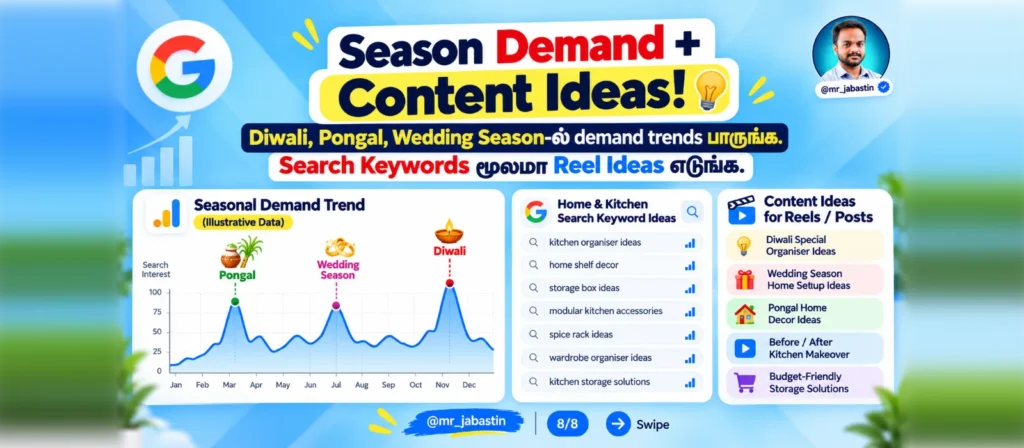
ஒரு Product-க்கு ஆண்டு முழுவதும் ஒரே மாதிரியான Demand இருக்க வேண்டிய அவசியமில்லை.
குறிப்பாக Home Decor, Decorative Lighting, Home Organizers போன்ற Products-க்கு சில Seasons-ல் Search Interest மாறக்கூடும்.
உதாரணமாக:
Diwali Season: Decorative Lights, Home Decoration Accessories போன்ற Keywords-ஐ Research செய்யலாம்.
Pongal Season: Home Decoration, Entrance Decoration போன்ற Keywords-ஐ Research செய்யலாம்.
Wedding Season: Home Gift Items, Decorative Storage Boxes போன்ற Keywords-ஐ Research செய்யலாம்.
Google Keyword Planner-ல் Historical Search Volume Trends மற்றும் Date Range தகவல்களைப் பார்த்து Demand-ல் மாற்றங்கள் இருக்கிறதா என்று ஆராயலாம்.
இதற்காக Google Trends Tool-ஐயும் பயன்படுத்தலாம்.
இதன் மூலம் உங்கள் Product Listing, Advertising Campaign மற்றும் Social Media Content-ஐ முன்கூட்டியே திட்டமிட உதவும்.
குறிப்பு: மேலே குறிப்பிட்ட Products-க்கு Festival Season-ல் Search Demand கண்டிப்பாக அதிகரிக்கும் என்பது உறுதி அல்ல. உண்மையான Search Data அடிப்படையில்தான் முடிவு செய்ய வேண்டும்.
இப்படி Data பார்த்து Product தேர்வு செய்வதுதான், இந்த Google Keyword Planner in Tamil Guide-ல் Beginners முதலில் கற்றுக்கொள்ள வேண்டிய Product Demand Research Method.
7. Instagram Reels & YouTube Content Ideas கண்டுபிடிப்பது எப்படி?
Google Keyword Planner என்பது Google Ads Campaign உருவாக்குவதற்கு மட்டுமல்ல.
இதை Content Marketing Research-க்கும் பயன்படுத்தலாம்.
உதாரணமாக, நீங்கள் Kitchen Storage Products விற்பனை செய்கிறீர்கள் என்று வைத்துக்கொள்வோம்.
Kitchen Organizer தொடர்பான Keywords-ஐ Research செய்தால், உங்கள் Customers எந்த விஷயங்களைப் பற்றி Google-ல் தேடுகிறார்கள் என்பதைப் புரிந்துகொள்ள உதவும்.
அதற்கேற்ற Content Topics உருவாக்கலாம்.
- Reel Idea 1: Kitchen Organizer – சின்ன Kitchen-ஐ Neat-ஆ Organize பண்ண 5 Smart Ideas!
- Reel Idea 2: Kitchen Wall Rack – Kitchen-ல் Storage Space அதிகரிக்க உதவும் Wall Rack Ideas!
- Reel Idea 3: Home Storage Box – வீட்ல இடம் பத்தலையா? இந்த Storage Ideas பாருங்க!
இவை Content Topic Examples மட்டுமே; Google-ல் அதிகமாகத் தேடப்படும் Keywords என்று உறுதிப்படுத்தப்பட்டவை அல்ல.
ஒரு Keyword Research-ஐ வைத்து Instagram Reels, YouTube Videos, Blog Articles, Product Descriptions மற்றும் Google Ads Campaigns போன்றவற்றுக்கான Content Ideas உருவாக்கலாம்.
8. Google Keyword Research செய்யும்போது Beginners தவிர்க்க வேண்டிய 5 Mistakes
Mistake 1 – Search Volume மட்டும் பார்ப்பது
ஒரு Keyword-க்கு அதிக Searches இருப்பதால் அந்த Product அதிகமாக விற்கும் என்று நினைக்க வேண்டாம். Customer Buying Intent-ஐயும் புரிந்துகொள்ள வேண்டும்.
Mistake 2 – Location Select செய்யாமல் இருப்பது
Chennai Customers-ஐ Target செய்யும்போது India முழுவதற்குமான Search Volume மட்டும் பார்த்தால் தவறான முடிவுகள் எடுக்க வாய்ப்பு உள்ளது.
Mistake 3 – Competition தவறாகப் புரிந்துகொள்வது
Keyword Planner-ன் Competition என்பது Google Ads Advertiser Competition. அது Amazon அல்லது Flipkart-ல் இருக்கும் Sellers எண்ணிக்கை அல்ல.
Mistake 4 – Seasonal Trends கவனிக்காமல் இருப்பது
சில Products குறிப்பிட்ட மாதங்களில் மட்டுமே அதிகமாகத் தேடப்படலாம். Historical Data-வை Compare செய்வது முக்கியம்.
Mistake 5 – Research செய்யாமல் Bulk Stock வாங்குவது
Keyword Research ஒரு ஆரம்ப Research Tool மட்டுமே. Supplier Price, Product Quality, Return Risk, Shipping Charges மற்றும் Profit Margin ஆகியவற்றையும் கணக்கிட வேண்டும்.
இதையும் படிங்க (Related Articles)
- Google Ads Keyword Research in Tamil: Keyword Planner, Match Types Guide
- Google Ads Optimization in Tamil: 5 Mistakes
- Instagram SEO: 7 Best Tips to Improve Google Search Visibility
- Google Analytics: Ecommerce Website Performance எப்படி Track செய்வது
- Free AI Tools for Digital Marketing in Tamil
- Digital Marketing Strategy for Small Businesses
9. Frequently Asked Questions (FAQ)
Google Keyword Planner Free Tool-ஆ?
ஆம். Google Keyword Planner-க்கு தனியான Subscription Fee இல்லை. ஆனால் Google Ads Account Setup, Billing Information உள்ளிட்ட Access Requirements பொருந்தலாம்.
Google Keyword Planner பயன்படுத்த Ads Run பண்ண வேண்டுமா?
Keyword Planner என்பது Google Ads Account-க்குள் இருக்கும் Tool. Google-ன் தற்போதைய வழிகாட்டுதலின்படி Account Setup மற்றும் Campaign Creation போன்ற படிகள் தேவைப்படலாம். Ads Spend இல்லாத Accounts-ல் Search Volume Ranges-ஆகக் காட்டப்படலாம்.
Google Keyword Planner Tamil Keywords-க்கு வேலை செய்யுமா?
ஆம். Tamil Language-ஐத் தேர்ந்தெடுத்து Keyword Research செய்யலாம். ஆனால் கிடைக்கும் Keyword Ideas மற்றும் Volume Data Search Activity-ஐப் பொறுத்து இருக்கும்.
Product Research-க்கு Google Keyword Planner பயன்படுத்தலாமா?
ஆம். ஒரு Product தொடர்பாக Google Search Demand இருக்கிறதா என்பதை ஆரம்ப நிலையில் ஆராய பயன்படுத்தலாம். ஆனால் Marketplace Sales Demand-ஐ இது நேரடியாகக் காட்டாது.
Google Keyword Planner மூலம் Instagram Content Ideas கண்டுபிடிக்க முடியுமா?
முடியும். Keyword Ideas-ஐ வைத்து Customers-க்கு பயனுள்ள Instagram Reels, YouTube Videos மற்றும் Blog Topics உருவாக்கலாம்.
10. Conclusion – Google Keyword Planner in Tamil
Online Business ஆரம்பிப்பதற்கு முன்பு Product Selection, Customer Demand மற்றும் Marketing Strategy போன்றவற்றைப் பற்றி Research செய்வது முக்கியம்.
அதற்கு உதவும் Free Keyword Research Tools-ல் ஒன்று Google Keyword Planner.
இந்த Google Keyword Planner in Tamil Guide மூலம் நீங்கள் கற்றுக்கொண்ட விஷயங்கள்:
- Google Keyword Planner என்றால் என்ன?
- Google Ads Account-ல் Keyword Planner பயன்படுத்துவது எப்படி?
- Monthly Searches, Competition மற்றும் Bid Range என்றால் என்ன?
- Home & Kitchen Products-க்கு Search Demand எப்படி Check செய்வது?
- Location மற்றும் Seasonal Trends எப்படி Research செய்வது?
- Keyword Research மூலம் Instagram Reels மற்றும் YouTube Content Ideas எப்படி உருவாக்குவது?
ஒரு Product நல்லா விற்குமா என்று Guess பண்ணுவதற்குப் பதிலாக, சரியான Data-வை Research செய்து Business Decisions எடுங்கள்.
Guess Work-ஐ குறைச்சு, Data-Based Business Decisions எடுக்க ஆரம்பிங்க!
Learn Digital Marketing in Tamil with Mr. Jabastin
Google Keyword Planner என்பது Google Ads மற்றும் Digital Marketing-ல் கற்றுக்கொள்ள வேண்டிய பல விஷயங்களில் ஒரு சிறிய பகுதி மட்டுமே.
நீங்கள் Digital Marketing-ஐ தமிழில் முழுமையாகக் கற்றுக்கொள்ள விரும்பினால், என்னுடைய All in One Digital Marketing Bundle பற்றி தெரிந்துகொள்ளலாம்.
இதில் Content Creator, Graphic Designing, Google Ads Masterclass, YouTube Marketing மற்றும் Social Media Marketing ஆகிய Courses உள்ளன.
மேலும் விவரங்களுக்கு Instagram-ல் @mr_jabastin பக்கத்திற்கு DM அனுப்புங்கள்.
Follow @mr_jabastin for more Digital Marketing Tips in Tamil!
